Claude.ai + Your Other Tools: Building a Connected Efficiency Stack
Claude.ai works well on its own. It works better when it connects to the tools you already use. This post is for tradespeople ready to think about their business as an operational system, covering job management, accounting and communication tools.


Series: Claude.ai for Tradespeople | Post 11 of 12
By this point in the series, you're using Claude.ai for quotes, customer comms, job sheets, reviews, social media, tax admin, tenders, and business documentation. Each of those is a standalone efficiency win.
Now it's time to think about the system how Claude.ai fits into the wider toolkit your trade business uses, and where the connections between tools start to multiply the value significantly.
This is the post for tradespeople who are ready to think about their business as an operational system, not just a collection of individual tasks.
The Trade Business Tech Stack - What Most Businesses Already Have
Job Management: Tradify, Jobber, ServiceM8, or similar for scheduling, job tracking, and invoicing
Accounting: Xero, QuickBooks, FreeAgent, or a spreadsheet
Customer Communication: WhatsApp, email (Gmail / Outlook)
Marketing: Google Business Profile, Facebook, Instagram, Checkatrade
Documents: Google Drive, Dropbox, or a folder on a laptop
Payments: GoCardless, Stripe, bank transfer
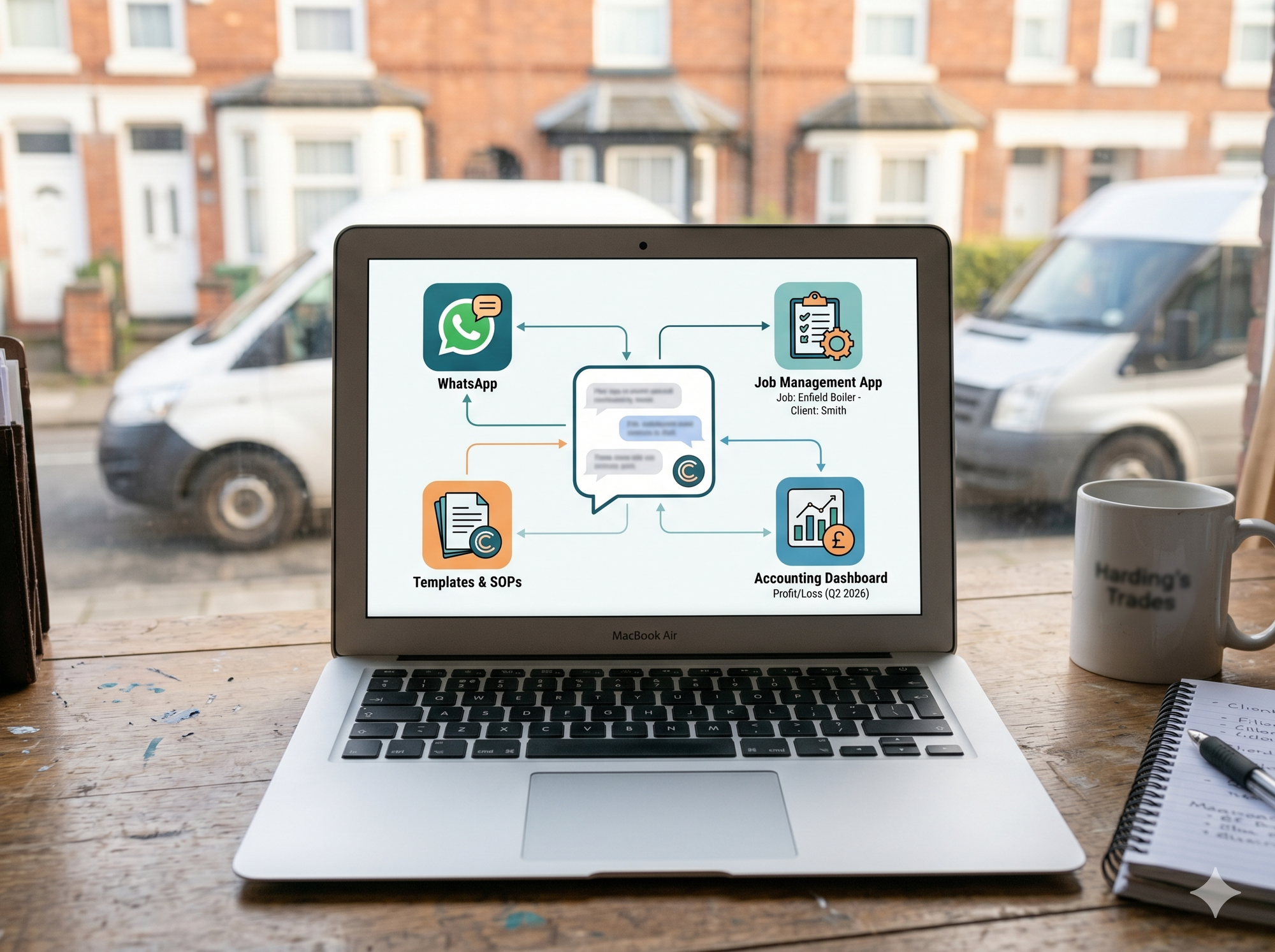
Claude.ai sits across all of these — not by connecting to them automatically, but by making the inputs and outputs of each tool faster, better, and more consistent.
Claude.ai + Job Management Software
Tools like Tradify and Jobber are excellent at managing the logistics of a trade business scheduling, invoicing, timesheets. Their weakness is the quality of written content. Job descriptions, customer-facing notes, completion summaries, these are typically brief and functional, written under time pressure at the end of a day.
The workflow:
- Complete the job
- Dictate your site notes (voice-to-text on your phone)
- Paste into Claude.ai with your job sheet prompt (Post 5)
- Copy the clean output into your job management software
This takes under three minutes and produces documentation that's detailed, professional, and complete.
Claude.ai + Xero / QuickBooks
Your accounting software handles the numbers. Claude.ai handles the language around the numbers, descriptions, categorisation notes, covering letters, and expense summaries.
Practical use: When you categorise an expense in Xero, the description field is often left vague ("Screwfix : £87"). Instead:
1. At the end of each week, list your expenses in Claude.ai
2. Ask it to produce clear, accountant-friendly descriptions and HMRC category suggestions (see Post 8)
3. Paste the descriptions into Xero
Clean records throughout the year mean a faster, cheaper year-end.
Claude.ai + WhatsApp Business
WhatsApp Business lets you set up automated greeting messages, away messages, and quick replies short text snippets you can send with a tap.
The workflow:
1. Use Claude.ai to draft your key customer message templates (Post 4 prompts)
2. Load the best ones as Quick Replies in WhatsApp Business
3. When you need to send a quote follow-up, a booking confirmation, or a payment reminder tap the Quick Reply, personalise if needed, send
WhatsApp Business Quick Replies to set up:
- Quote acknowledgement
- Post-survey thank you
- Booking confirmation
- Review request
- Payment reminder (friendly, first nudge)
Claude.ai writes these once. WhatsApp Business deploys them repeatedly.
Claude.ai + Google Drive / Docs
Google Docs is free and cloud-based, a natural home for the Business Bible documents built in Post 10.
Suggested folder structure:
/[Business Name]
/Operations
/SOPs
/Risk Assessments
/Method Statements
/HR
/Induction Pack
/Job Descriptions
/Commercial
/Capability Statement
/Tender Library
/PQQ Responses
/Marketing
/Social Media Templates
/Review Response Templates
/Finance
/Invoice Templates
/Expense Categories
Every document Claude.ai produces for you has a home. Every new team member can access the right document instantly.
Introducing Automation: Zapier and Make
For tradespeople ready to go further, automation platforms like Zapier and Make connect your tools and trigger actions automatically. You don't need to write code. You build workflows visually.
Examples of what's possible:
- A new job booked in Tradify automatically sends the customer a WhatsApp confirmation message
- A completed job in Tradify automatically triggers a review request message 24 hours later
- A new Google review automatically gets flagged to you by email so you can respond promptly
These workflows are built once and run indefinitely. Claude.ai doesn't connect directly to these tools but the templates and messages Claude.ai helps you create are exactly what these automations deploy.
The Honest Assessment: What You Don't Need
Most trade businesses don't need CRM software, complex marketing automation, or elaborate project management platforms. They need:
1. A job management tool that handles scheduling and invoicing
2. Accounting software that connects to their bank
3. WhatsApp Business for customer comms
4. Google Drive for document storage
5. Google Business Profile for local visibility
6. Claude.ai for the quality of every written output across all of the above
That's a lean, high-functioning business system. Get this working consistently and you're ahead of the vast majority of your competitors.